
Overview of Elgato Eve Energy
Elgato Eve Energy is a HomeKit-focused smart plug that connects via Bluetooth, letting you control devices from the Eve or Apple Home app and with Siri. It offers physical button control, scene integration, and detailed energy monitoring (watts, kWh, cost, and graphs). Setup is quick via the Eve app using the camera or Add Accessory flow. It lacks Amazon Alexa and Google Home support, is somewhat bulky, and is priced at £45.
Quick Solutions to Questions related to Elgato Eve Energy:
-
How do I set up Elgato Eve Energy?
Plug Eve Energy into a socket, download the Eve app from the App Store, open the Eve app and tap Add Accessory (or use Eve settings if you already have accessories); the app will guide you through setup and can read the serial number with your camera. -
Can I control Eve Energy with voice commands?
Yes, you can control Eve Energy using Siri via Apple HomeKit. -
Does Eve Energy use Wi-Fi or Bluetooth?
Eve Energy connects through Bluetooth, not via your Wi-Fi network. -
What energy monitoring features does Eve Energy provide?
It shows current consumption in watts, total consumption in kWh over hours/days/weeks/months, cost estimates based on your kWh price, and bar graph reports. -
Does Eve Energy work with Amazon Alexa or Google Home?
No, the device does not support Amazon Alexa or Google Home; it is designed for Apple HomeKit. -
What is the price of Elgato Eve Energy?
The price listed in the article is £45.
Hard to get Apple Homekit enabled smart plugs, to cover that gap Elgato eve energy launched exclusively to support Apple Homekit to fill that gap.
This switch easily integrates with Apple’s HomeKit and – if Apple’s ecosystem isn’t for you Elgato even offers a multi-platform-compatible smart app.
How to Use Elgato Eve Energy
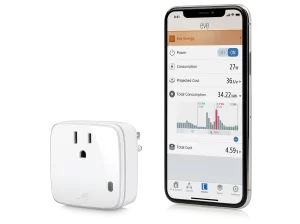
Elgato Eve Energy switch is an absolute breeze. It works like any other smart switch out there: simply plug it into the outlet, then plug the device you want to control into it.
The Elgato Eve Energy switch connects through Bluetooth – not via your Wi-Fi. Despite not being connected to your home network it is super responsive and easy to use.
Once it’s installed, you’ll be able to turn the switch on and off straight from your phone.
Track power usage of any device you want to.
Related: Elgato Eve Room
Features
The Eve app is built to control your HomeKit-connected devices, and you’ll likely either use it or the Apple Home app.
Control lights from Phone
The Eve device lets you tap a button in the Eve app to turn it on or off, and there’s even a physical button on the little white box itself that will do the same job, which is utterly perfect.
Set Scenes
Scenes enable multiple accessories to work in concert. So you can create a scene called “Bedtime” that turns on your bedside lamp via Eve Energy, locks your doors, and shuts your shades – all with one tap or voice command.
Related: Homepod Automation
Power Meter
Upon tapping the plugs name, you can access an extensive list of reports. It will cover your current consumption in watts. Your total consumption in kWh over the course of hours, days, weeks, or months. Entering your cost per kWh, it can tell you how much you’re paying to run an appliance. These are also laid out in easy to digest bar graphs. It’s the best energy monitoring system I’ve come across and I find myself using it as much to check power consumption on different items in my home as I do for home automation.
Integration with Other Homekit Devices
Elgato’s got a serious plan here, as the app itself can do a lot of things like turn on a selection of smart plugs in your home that you group together into “scenes,” like maybe your lamp, a stereo, and your gaming console all at once. The app also integrates all of Eve’s other great gadgets, like the Eve Weather and Eve Door & Window.
Control via Siri
One of the biggest attractions of HomeKit is being able to use your voice with Siri to control your lights and appliance (but not Amazon Echo or Google Home currently).
Related: Apple Homekit Devices 2019
For or Against
|
For |
Against |
|
Design is nice |
Expensive |
| Offers great energy monitoring |
Bulky design |
|
Works with HomeKit |
No support for Amazon Alexa or Google Home |
How to Setup
Setting up the Eve is really simple, the iOS app even uses your camera to read the serial number and pair the device. Everything was up and running very quickly and trouble free.
Alternate:
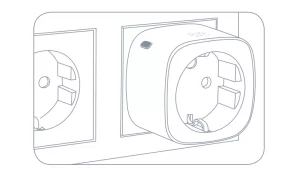
Plug Eve Energy into a socket
 Download the Eve app from the App Store

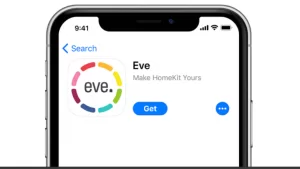
Open the Eve app and tap Add Accessory. Eve will now guide you through the setup process to remotely control your devices

If you have already set up another accessory, go to the Eve settings to add Eve Energy to your home

Control devices connected to Eve Energy from the app or using Siri

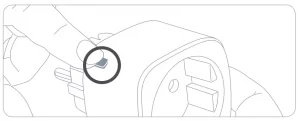
You can also use the button to control devices connected to Eve Energy
Price:
About The Author

Hassan Zaka
I am an expert in accounting and possess diverse experience in technical writing. I have written for various industries on topics such as finance, business, and technology. My writing style is clear and simple, and I utilize infographics and diagrams to make my writing more engaging. I can be a valuable asset to any organization in need of technical writing services.
Follow Us:LinkedinTwitter


