Overview of The Google Home App Has Been Updated To Make Operating Smart Devices A Bit Easier.
Google is rolling out a redesigned Home app for Android and iOS that simplifies controls and improves privacy settings. The update introduces tap-to-toggle device controls, brightness sliders, and long-press access to advanced options, plus a consolidated settings area for privacy, Assistant data, and home activities. Later this month, the app will add an improved home feed with automated sorting and grouping to surface recent and important events.
Quick Solutions to Questions related to Google Home App:
-
What new control interactions does the Home app introduce?
Users can tap devices to switch them on or off and use built-in sliders to adjust brightness, with long press revealing advanced options. -
Can I manage privacy and Assistant data from the Home app?
Yes, the update consolidates privacy restrictions, Assistant data, and home activities into a single settings area in the Home app. -
When will the redesigned Home app start rolling out?
Google said the update is due out this week, with additional features coming later this month. -
How will the home feed change in the update?
The home feed will gain automated sorting and grouping to highlight recent and essential events. -
Does the new design resemble any Android smart home controls?
Yes, the design is similar to Android 11 power menu smart home controls and Android 12 quick settings widget controls.
Google’s ‘Home’ app for Android and iOS should be much improved in the near future.
On both platforms, the search giants are planning improvements to Home that will clean up the interface and simplify controls. Users might also expect certain privacy enhancements.
Google detailed the upcoming changes in a Nest Community blog post (via Engadget), including screenshots of the new design. Anyone familiar with Android 11’s smart home controls in the power menu (or 12’s controls in the quick settings widget) will feel at home – pardon the pun — with the new Home app.
People will be able to tap gadgets to switch them on or off or alter the brightness of lighting using a built-in slider. Furthermore, when users long press on the new controls, advanced choices will appear.
Users will be able to configure privacy restrictions, Assistant data, and home activities via the Home app’s new settings area. The modification consolidates these controls into a single spot, making them more accessible.
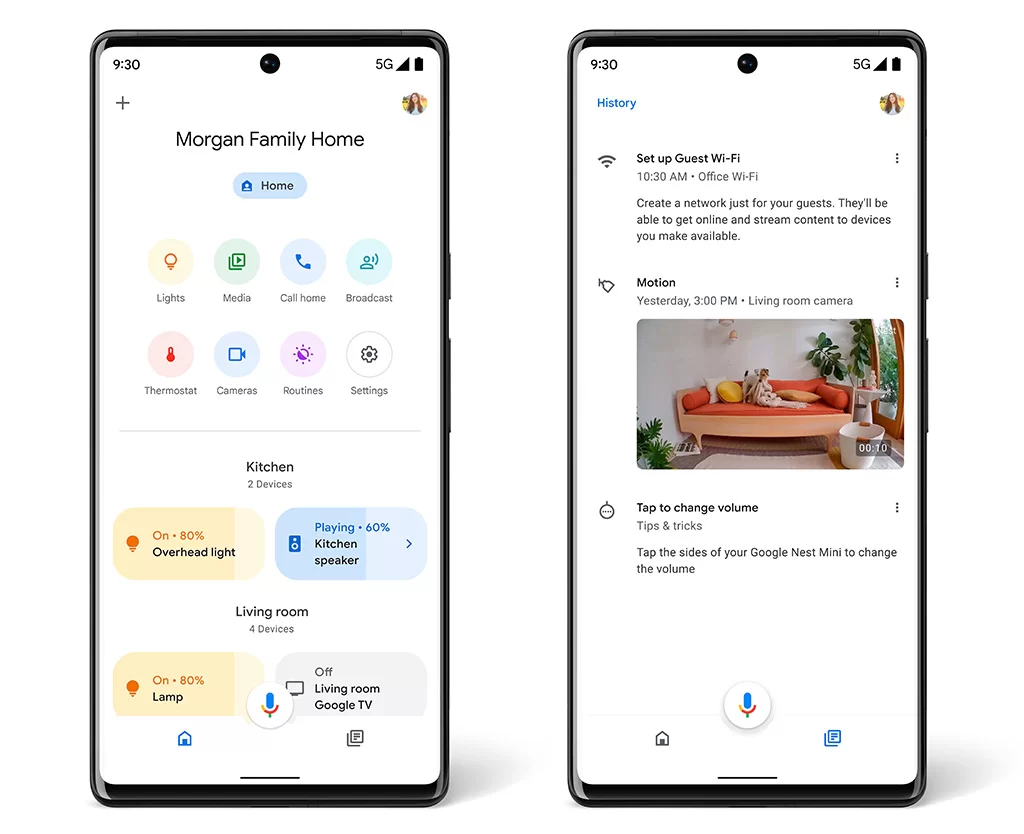
These improvements are part of an update due out this week, but Google has more in store for later this month. The home feed will be improved as a result of the change, with new automated sorting that will highlight recent and essential events, as well as a grouping.
You can learn more about the Home app updates here.
More:
- The Redesigned Google Home Tab Makes It Much Easier To Operate Your Smart Devices.
- Google Home Best Smart Lights
- With Matter Syncing Alexa Google Nest and Apple smart home technology will be a breeze.
About The Author

Hassan Zaka
I am an expert in accounting and possess diverse experience in technical writing. I have written for various industries on topics such as finance, business, and technology. My writing style is clear and simple, and I utilize infographics and diagrams to make my writing more engaging. I can be a valuable asset to any organization in need of technical writing services.
Follow Us:LinkedinTwitter