Overview of The Redesigned Google Home Tab Makes It Much Easier To Operate Your Smart Devices.
The Google Home app (version 2.49) introduces a revamped home view with rectangular, rounded tiles replacing large device icons. Tiles are interactive: tap to toggle devices, swipe left or right to adjust volume or brightness, and long-press to open full-page controls. The new device grid is available on iOS and is rolling out to Android (reported activatable in 2.49.1.8). Recent Google Home updates also added a virtual remote for Android TV/Google TV and a tool to test device connection speed to Nest Wi-Fi.
Quick Solutions to Questions related to Google Home app revamp:
-
What changed in the Google Home app version 2.49?
The app replaced huge device icons with rectangular rounded tiles and added interactive swipe, tap, and long-press controls. -
Can I adjust volume and brightness from the main tab?
Yes, you can swipe left or right on the new tiles to change volume and brightness directly from the main tab. -
Does tapping a tile still turn devices on or off?
Yes, tapping a tile switches a device on or off, and long-pressing opens full-page controls. -
Is the new device grid available on Android now?
The new UI is available on iOS; Android does not have it widely yet, though it was reported activatable in Google Home 2.49.1.8. -
What other recent features has Google Home received?
Recent updates added a built-in virtual remote for Android TV and Google TV and a tool to test device connection speed to Nest Wi-Fi.
You’re undoubtedly acquainted with the Google Home app if you own a Nest speaker or a Google Assistant-enabled gadget. The companion app serves as your central control and management hub for your smart home devices. And it is now undergoing a revamp that will make it even easier to operate devices directly from the main tab.
The Google Home app has received an upgrade to version 2.49, which includes an enhanced home view that allows you to configure devices in less steps, as reported by 9to5Google. The huge device icons have been replaced with rectangular tiles with rounded corners in the update.
The tiles are interactive, so you can change the volume and brightness by swiping left or right. And, as previously, you can still switch a gadget on or off by tapping on the buttons. Long-pressing a button, on the other hand, brings up full-page controls.
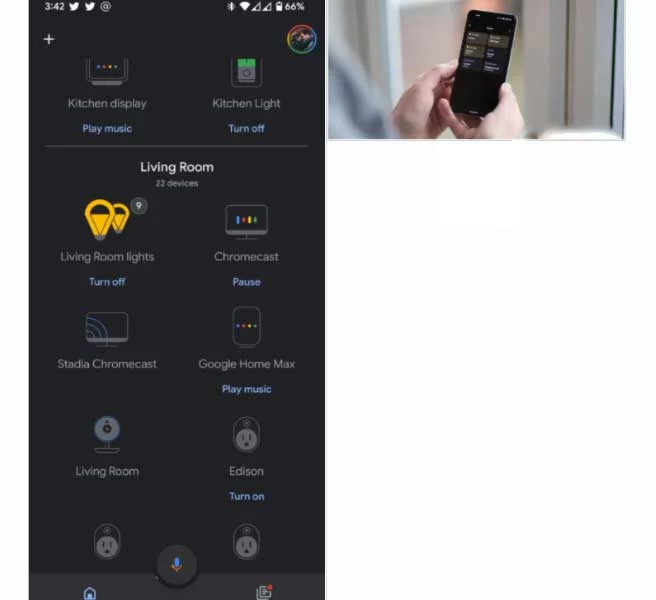
You can quickly discover what you’re searching for, lower your compatible lights, and adjust the audio level. Tap to switch on or off a device, slide left or right to make changes, and long press to access further options.
With Google Home version 2.49, the new device grid layout is now available on iOS. The new UI, however, isn’t accessible on Android with the most recent version. 9to5 Google says they were able to activate the makeover in Google Home 2.49.1.8, so it shouldn’t be long until it becomes available to everyone. We’ll keep an eye out and let you know once it rolls out widely on Android.
Over the last several months, the Google Home has gained a slew of new capabilities and enhancements. Late last year, the app received an update that included a built-in virtual remote for controlling your Android TV and Google TV sets. It can now evaluate the speed of the connection between your smart home devices and the Nest Wi-Fi router.
About The Author

Hassan Zaka
I am an expert in accounting and possess diverse experience in technical writing. I have written for various industries on topics such as finance, business, and technology. My writing style is clear and simple, and I utilize infographics and diagrams to make my writing more engaging. I can be a valuable asset to any organization in need of technical writing services.
Follow Us:LinkedinTwitter