Overview of Nanoleaf Rhythm Module
The Nanoleaf Rhythm is an add-on module that turns Nanoleaf Light Panels into a real-time music visualizer, detecting nearby sounds to animate panels with various patterns, colors, and brightness tied to volume and duration. It offers eight scenes, app presets, voice control via Alexa, Siri, and Google Assistant, works with HomeKit, Android, and IFTTT, is easy to install, and costs £34.99 (UK) or $49.99 (US).
Quick Solutions to Questions related to Nanoleaf Rhythm:
-
How does the Nanoleaf Rhythm detect sound?
It uses a built-in sound sensor (and a 3.5mm jack) to detect nearby noises and activates the Aurora lights accordingly. -
Can I control Rhythm presets with voice assistants?
Yes, you can trigger rhythm presets using Alexa, Siri, or the Google Assistant. -
What devices and platforms does Nanoleaf Rhythm work with?
It works with iOS8 or later (HomeKit), Android 5.01 or later, Google Assistant, Apple Home App, Amazon Alexa, and IFTTT. -
How many built-in lighting scenes does the Rhythm include?
Rythm comes with eight lighting scenes that dictate how lights respond to sound. -
How do I install the Nanoleaf Rhythm module?
Plug it into an open connector slot on your Aurora panels, wait a few seconds, then a blue light indicates it is working. -
How much does the Nanoleaf Rhythm cost?
It is priced at £34.99 in the UK and $49.99 in the US.
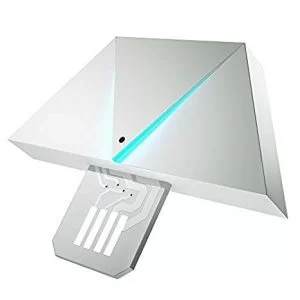
The Nanoleaf Rhythm module is an add-on module for your Nanoleaf Light Panels that upgrades your light panels into a real-time music visualizer.
Features
- The Rhythm makes it possible to see sound, visually remastering your music into animated displays of colour and light.
- The Rhythm has a sound sensor (and a 3.5mm jack) and is able to detect all noise, whether it be a song, the television, a conversation, a cat meowing, a door slamming, or a baby crying, and when it hears a noise, it activates the attached Aurora lights in various patterns, colors, and brightness levels.
- Sensitive enough that it picks up most sounds nearby, and the light reaction to the sound is tied to both the volume and the duration of the sound.
- Nanoleaf Rhythm is niche novelty for the smart home that isn’t for everybody. But if you’ve already found a place in your home for those Aurora panels (or if you’d like to), then the Rhythm module will give them some undeniably nifty new tricks.
- You can get a variety of rhythm-based presets in Nanoleaf’s app for Android and iOS devices, and you’ll also be able to trigger those presets using voice commands with Alexa, Siri or the Google
- There are several different light patterns to choose from that work with the Rhythm, and all of the patterns can be combined with customized user-picked colors for an endless number of options.
- Rhythm comes with eight lighting “scenes” that dictate how the lights are activated when sound is detected.

Nanoleaf Rhythm works with iOS8 or later (HomeKit), Android 5.01 or later and Google Assistant, Apple Home App, Amazon Alexa, and IFTTT.
Get to know: Intelligent Lighting Systems Home
How to Install
- Installing the Nanoleaf Rhythm module is about as easy as it gets
- Plug it directly to an open connector slot of a aurora panels
- Wait for a few seconds
- Then you’ll be able to get a rhythm itself blue light that lets you know it’s working.
Reviews
Nanoleaf’s music-syncing Rhythm module is incredibly easy to use, and it works well with a wide variety of music. You can trigger rhythm presets using voice commands with Siri, Alexa or the Google Assistant.
The tool for creating your own presets is very basic, only letting you pick a color palette and a single animation style.
Price
£34.99 UK
About The Author

Hassan Zaka
I am an expert in accounting and possess diverse experience in technical writing. I have written for various industries on topics such as finance, business, and technology. My writing style is clear and simple, and I utilize infographics and diagrams to make my writing more engaging. I can be a valuable asset to any organization in need of technical writing services.
Follow Us:LinkedinTwitter