Overview of Crestron PYNG App
Crestron Pyng is a free iOS home automation app that lets installers set up and control lighting, audio, shades, thermostats, locks, and security from iPad, iPhone, and iPod touch devices. It auto-discovers wired devices, pairs wireless accessories via PYNG-HUB, supports up to 200 infiNET EX accessories and 20 touchscreens, offers instant scene creation and real-time editing, integrates with Crestron systems and VT Pro-e, and supports many streaming sources and languages. No laptop is required; scenes apply immediately and TSW touch screens are auto-added.
Quick Solutions to Questions related to Crestron Pyng:
-
How do you set up Pyng from an iPad?
Open the Pyng app on an iPad, choose or name a room, pair wireless accessories to the PYNG-HUB or let the app discover wired devices, assign devices to rooms, create and save scenes. -
Can Pyng control audio and streaming services?
Yes; Pyng supports audio streaming sources, distribution systems, and devices like the CEN-TRACK TunerRack for AM/FM, satellite, and Internet radio. -
Does Pyng require a laptop for setup?
No; the app does not require a laptop and can completely set up connected devices from an iPad. -
What device and accessory limits does Pyng support?
Pyng supports up to 200 infiNET EX accessories via a PYNG-HUB plus four external gateways, and up to 20 touch screens; audio can be added to up to 72 rooms. -
How are touch screens integrated into a Pyng system?
Connected Crestron TSW-552/TSW-752/TSW-1052 touch screens automatically download and run the Pyng app and are added to the system for instant control.
A free home automation app to set up these devices with custom presets on an Apple® iPad® and control them from iPad, iPhone®, and iPod touch® devices.
A Crestron touch screen that is connected to the Pyng system automatically adds the entire system, providing instant connectivity and control.
You can listen to music in any room or share audio sources throughout rooms for party mode and trigger environmental scenes within the Pyng network.
You can turn up or down the lights, set the thermostat to an ideal temperature, and tune in the audio system to your favorite streaming service, all at the touch of a button.
Pyng is designed to flawlessly integrate with every Crestron® system. Add a Pyng control hub to every 3-Series® control system and set up the audio, lights, shades, thermostats, and locks in minutes.
Related: Getting Started With Home Automation
Main Features
- Completely sets up connected devices from iPad® and controls them from iPad, iPhone®, and iPod touch® devices
- Supports wireless infiNET EX® lighting controls, audio streaming sources and audio distribution systems, Crestron shades, wireless thermostats, Yale® wireless door locks, and security systems
- Does not require a laptop for setup
- Automatically downloads and runs on connected TSW-552/TSW-752/TSW-1052 touch screens
- Supports up to 200 infiNET EX accessories via dedicated hub (model PYNG-HUB) and four additional external gateways
- Supports up to 20 touch screens.
- Comes with All On and All Off smart scenes for the entire home, as well as Master Raise and Master Lower shades
- Operates in separate integrator or homeowner modes
- Interfaces with MyCrestron.com for backup
- Implements scenes immediately after saving them
- Adjusts lighting levels, shade positions, etc. in real-time when editing scenes
- The Pyng app can support up to 200 infiNET EX accessories through the use of the dedicated hub (model PYNG-HUB) and four external gateways.
Streaming
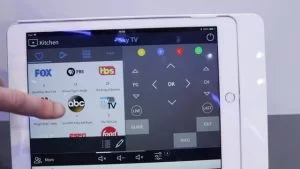
- Crestron Pyng pairs with a diverse selection of devices to bring a variety of music streaming services to any room in a home.
- Listen to AM/FM radio, satellite radio, and Internet radio with the CEN-TRACK TunerRack Modular Multi-Tuner.
Integration
- Add DigitalMedia™ remotes and access custom advanced programming of any Pyng system through VT Pro-e® software. The Pyng SmartObject can be pulled into any Crestron project, where it is instantly reskinned to match the custom user experience design.
Related: Home Automation Lighting Control Systems
Audio
- Audio streaming sources, amplifiers, and touch screens are wired devices that automatically display as available in the app when they are connected to the network.
- Add speakers to up to 72 independent rooms and even bridge speakers for rooms that need more power.
- Add up to 20 touch screens to a single system.
Specification
Compatible With
IPad Air, iPad® with Retina display (4th generation), iPad (3rd generation), iPad mini with Retina display, iPad mini, iPhone® 6 Plus, iPhone 6, iPhone 5s, iPhone 5c, iPhone 5, iPhone 4s, iPod touch (5th generation), requires Apple iOS 6.1 (or later) and a mobile broadband or Wi-Fi® network connection.
Languages
Arabic, Chinese (Simplified), Chinese (Traditional), Czech, Danish, Dutch, English, Finnish, French, German, Greek, Hebrew, Hungarian, Italian, Norwegian, Polish, Portuguese (Brazil), Portuguese (Portugal), Romanian, Russian, Slovak, Spanish (Europe), Swedish, Thai.
Price
Free, downloadable app
How to Setup
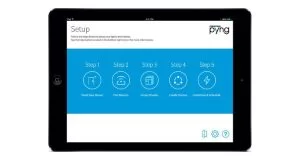
Open the app on an iPad and then configure the Pyng network by following these simple steps:
First step is to choose room
Selecting a room name from the pre-populated list of common room names or by typing a custom name into the app and saving it.
Paired
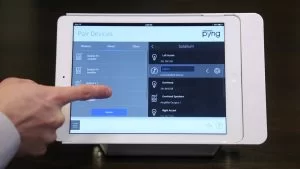
The integrator can quickly pair wireless accessories to the PYNG-HUB directly from the app.
Wired devices are discovered automatically by the app and then must be paired with specific rooms to enable access.
Set Scenes
Create new scenes by presenting the integrator with a scrollable list of all of the rooms in a home. From this list, integrators can select a particular room, edit the scene settings, and then save the scene for immediate use.
Set Up Keypads
Need to pair keypad with PYNG the app prompts the integrator to choose the color and identify the button layout of the keypad. The app presents an image of the keypad as the integrator presses each button, which ensures that buttons are properly identified and accurately used by the app.
About The Author

Hassan Zaka
I am an expert in accounting and possess diverse experience in technical writing. I have written for various industries on topics such as finance, business, and technology. My writing style is clear and simple, and I utilize infographics and diagrams to make my writing more engaging. I can be a valuable asset to any organization in need of technical writing services.
Follow Us:LinkedinTwitter