Overview of How To Connect Blink Mini To Echo Show
Blink cameras work indoors and outdoors, offering motion detection, two-way audio, and night vision. They integrate with Echo Show and Echo Spot via the Blink Smarthome Alexa skill, letting you arm/disarm and view Live View by voice. Setup involves enabling the skill in the Alexa app, logging into Blink, discovering devices, and renaming cameras for voice-friendly commands. The skill is available in English and German.
Quick Solutions to Questions related to Blink and Echo Show:
-
How do I link Blink to Echo Show?
Enable the Blink Smarthome skill in the Alexa app, log in with Blink credentials, and follow prompts to link accounts. -
How do I discover my Blink cameras in the Alexa app?
Use the SmartHome Discover devices option in the Alexa app or follow the skill prompts to discover and add your Blink cameras. -
Can I view Live View from Blink on my Echo Show by voice?
Yes, after setup you can say show me my and the Blink camera will show Live View on the Echo device. -
Does Blink support motion-triggered auto view on Echo Show?
The article mentions Auto View using motion detection as a topic, indicating motion-triggered viewing functionality is available or discussed. -
Which Echo devices work with the Blink skill?
The skill works with Echo Show and Echo Spot and is available in English and German.
A home surveillance camera can assist with this by helping you to see what’s going on in your home without having to come too personal.
The Blink cameras are ideal for both indoor and outdoor use, and you can monitor the action on your phone or a compatible Echo system, such as an Echo Show.
You can now use your Echo Show and Echo Spot with Blink! You can use your voice to not only arm and disarm your cameras but also to see your Blink cameras. All you have to do is ask.
Blink cameras have customizable motion detection, two-way audio, and night vision, and can withstand elements like rain and snow. They’re durable and reliable for peace of mind.
Amazon’s Echo Show has all the Alexa features you love, plus the added convenience of a screen. It displays the time, has access to Prime Video, and (obviously) can show you what your security cameras are seeing.
Here is How to Connect Blink Mini to Echo Show
So How to View Blink Camera on Echo Show
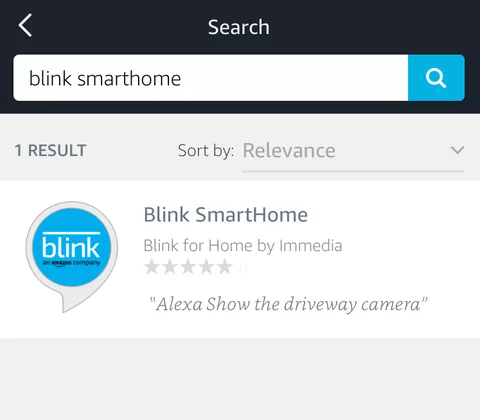
- Go to the Alexa app and search for Blink Smarthome under skills, you should find the skill with the Blink, an Amazon company logo.
- Click on it and then click on Enable Skill.
- That will take you to a Blink login page, where you log in with your Blink credentials. If you login correctly it will tell you that you have linked your Blink account.
- Follow the directions in the Alexa app to discover your Blink cameras. If you get lost go to SmartHome (under the top menu) and select Discover devices.
- It should discover your Blink cameras and add them to your SmartHome. You can rename them in the Alexa app to give them voice-friendly names.
Once that is done, you can say “show me my” and your Blink camera will show Liveview on your Echo device.
This current skill is available in English and German and works with Echo Spot and Show.
About The Author

Hassan Zaka
I am an expert in accounting and possess diverse experience in technical writing. I have written for various industries on topics such as finance, business, and technology. My writing style is clear and simple, and I utilize infographics and diagrams to make my writing more engaging. I can be a valuable asset to any organization in need of technical writing services.
Follow Us:LinkedinTwitter